Request for Information
Setting: RFI Discipline Selection Option
- If the setting is misconfigured, Contract Administrator or General Contractor Project Manager will receive an error message when creating a new Request for Information.
Site Visit
- Similar to Meeting documents, project participants can now attach real-time PDF status reports in their Site Visit document.
- Visit our Users Guide for more information
Fixes
- Request for Substitution (RFS):
- RFS in “Requesting Recommendation” status no longer errors when “Close & Create” action button is selected.
- Documentation:
- When a Documentation is re-opened for editing, the “initiated by ” name is now maintained.
- Document Type dropdown list now displays in alphabetical order on both browse
Notice: Trying to access array offset on value of type null in /home2/plaidint/public_html/onwarepast/wp-content/plugins/js_composer_salient/include/autoload/vc-shortcode-autoloader.php on line 64
Notice: Trying to access array offset on value of type null in /home2/plaidint/public_html/onwarepast/wp-content/plugins/js_composer_salient/include/autoload/vc-shortcode-autoloader.php on line 64
Notice: Trying to access array offset on value of type null in /home2/plaidint/public_html/onwarepast/wp-content/plugins/js_composer_salient/include/autoload/vc-shortcode-autoloader.php on line 64
Notice: Trying to access array offset on value of type null in /home2/plaidint/public_html/onwarepast/wp-content/plugins/js_composer_salient/include/autoload/vc-shortcode-autoloader.php on line 64
Notice: Trying to access array offset on value of type null in /home2/plaidint/public_html/onwarepast/wp-content/plugins/js_composer_salient/include/autoload/vc-shortcode-autoloader.php on line 64
Notice: Trying to access array offset on value of type null in /home2/plaidint/public_html/onwarepast/wp-content/plugins/js_composer_salient/include/autoload/vc-shortcode-autoloader.php on line 64
Project Summary Dashboard
Stay on top of your project
Visualize your project documents real-time progression quickly with an overview of details, including:
• One-click document access
• Status signifying the documents workflow stage
• Color coded aging to monitor how many days the document has been in progress
• Waiting for and Responded columns reflecting who is still outstanding and who has responded
• PDF Printable
Track outstanding items with automated E-mails
Scheduled E-mail Reports
Maintain standards on turn-around times across all projects you manage. Choose to receive a summary report delivered directly to your inbox on a recurring scheduled basis.
Manual Spreadsheets & Logs: A Task of the Past
Flexible & detailed document reports
You control what data displays on document reports, using filters conveniently located on the document’s search page. Each document type in Onware provides, at minimum, two types of reports:
1. Summary version formatted for printing
2. Csv file for use in your favorite spreadsheet program
Summary version reports typically include information such as:
• Document number, title and status
• Document date details, such as: Issued, reviewed, approved, required by dates
• Automated calculation results, such as: Average response time, Total value of Changes to date, Revised Contract value
Actionable Insights with BI integrations
Interactive Data Visualizations
Identify key trends, decrease project risk and reduce profit erosion with complete transparency into your portfolio and individual projects. Bringing all your project data together into a single place with third-party Business Intelligence tools, such as Tableau and Power BI, so you can compare performance and project data in your own way.
Notice: Trying to access array offset on value of type null in /home2/plaidint/public_html/onwarepast/wp-content/plugins/js_composer_salient/include/autoload/vc-shortcode-autoloader.php on line 64
Let's collaborate on your next project
Notice: Trying to access array offset on value of type null in /home2/plaidint/public_html/onwarepast/wp-content/plugins/js_composer_salient/include/autoload/vc-shortcode-autoloader.php on line 64
- Updated numbering format for Submittal to allow single digit Division number and/or Specification Section number when document syncs in Onware.
Settings
To help Project Administrators, instructions are now available when editing a setting in version 9.27.0.

Meetings
In version 9.27.0, when “copy” is used, all fields will be copied except Meeting Type. User should select the Meeting Type which will copy all outstanding Meeting Items to the new Meeting.
Fixes
- Request for Information
- When Onware Sync transfers an RFI to Onware, it now displays the most current discipline selection
- Meeting
- Selecting “Save”, “View/Print” or “PDF” from top toolbar now saves changes/revisions to Meeting Items
- Request for Information
- When providing a response to Request for Information, texts entered on either comments or suggestions field can now be saved using either the top toolbar or RFI history “Save” button
- Submittal
- Displays an error when a General Contractor selects “close” from “select an action” options
- Site Visit
- New or imported Site Visit items can now be sorted by order
- Checklist headers now display when editing a Site Visit
- Consultant Recommendation
- Re-open Consultant Recommendation error message spelling corrected
- Implemented performance improvements when loading email subscriptions list for a project
- Browser-related: Google Chrome
- Users can now switch between projects
- Current user is updated and displayed correctly when “Impersonate” function is used
Contract Administrator can now enter a Quotation on behalf of a General Contractor when pricing is required on a Change Directive.

When “Enter on Behalf of Contractor” is selected, Contract Administrator will be directed to the Quotations page and will be required to select the General Contractor the Quotation is being entered on behalf of in the “Issued By” field as well as the date is was “Issued On”.

Things to Consider
- “Enter on Behalf of Contractor” feature is only available when the Change Directive setting “Automate Pricing” is enabled
- When “Enter on Behalf of Contractor” feature is used, Issued By and Issued On date fields are required
Fixes
- Browser-related: Google Chrome
- Users can now switch between projects
- Current user is updated and displayed correctly when “Impersonate” function is used
- Site Visit
- Strikethrough formatting is now displayed on printed form
- Site Visit Checklist amendments now save
- Details entered in General section maintained when new items are created
- Contract Administrators with project-level assigned access no longer receive an error when reviewing an issued Recommendation
- Contract Administrators no longer receive an error when creating a Recommendation when reviewing a Request for Substitution
- Submittal numbering on the Standard Report inherits the sort order from the Submittal search page
- Contract Administrators now have edit access from search page when a Change Directive moves to “pricing” status
- Change Order:
- Standard Report now displays the Change Title and Change Amount of all associated Changes and Change Directives
- Change Order warning message package spelling corrected
- Increased the maximum number of documents to combine when package is selected
- When a Request for Information is cancelled, action items are now cleared and users no longer have edit access from search page
- Request for Substitution:
- Details in General, Substitution and Product sections are no longer removed when “Not Accepted”
- Revision number displays on printed form and on linked document association
- Consultant is now directed to the confirmation page when issuing a Site Visit
- User with Project-level Contract Administrator access can now return a Consultant Recommendation
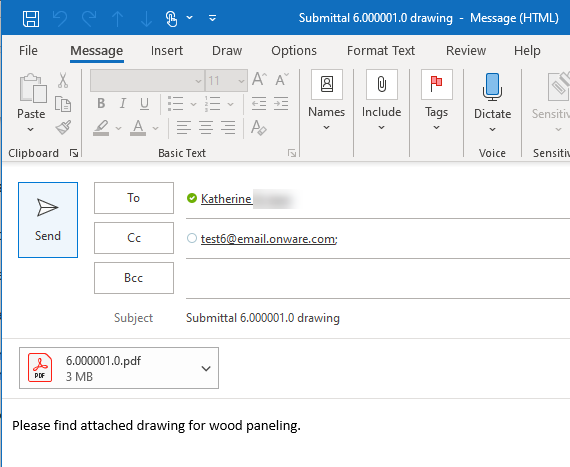
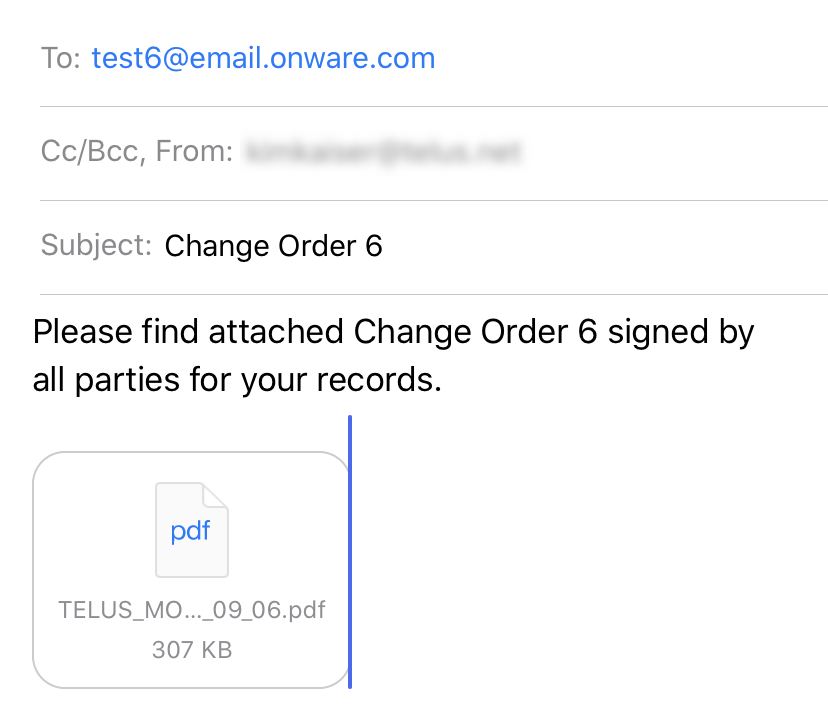
Onware continues to innovate and implement functionality to enhance your project experience. Receiving and storing project e-mails with Onware is the first of many new and exciting e-mail features on our software development roadmap.
How to use Onware’s project e-mail is quick and easy! Simply include the project’s unique e-mail address in any project e-mail communication. Whether forwarding an existing e-mail from your inbox, or include the project’s e-mail address as a “To” or “Cc” recipient when sent, Onware does the rest!
Configure your Onware Cloud project with a unique e-mail address to have Onware automatically capture, store and record incoming e-mails along side all your other project documents in Onware’s centralized and secure location. Visit our User Guide for steps to configure and how to view project e-mails.
Notice: Trying to access array offset on value of type null in /home2/plaidint/public_html/onwarepast/wp-content/plugins/js_composer_salient/include/autoload/vc-shortcode-autoloader.php on line 64
Standard Search Page Layout, including Package and Email Package functions, now available everywhere!
The consolidated action link dropdown is now standard on all document types. Actions available will be dependent on user’s access and status of the document. Previously, Package and E-mail Package functionality was available only on certain documents. All feedback on these two new features has been positive and we are happy to announce in version 9.24.0, we have these features across all documents.

E-mail Package Improvements
When “E-mail Package” is selected, a confirmation message will display letting you know that your request is being processed.

A threshold has been identified when the number of documents for a Change Order package is too large and the package will be unsuccessful in generating. When this threshold is exceeded, a warning message will now display and the package will not be available.
Site Visit
Create & Edit Site Visit Item
Prior to 9.24.0, “New Item” displayed as a pop-up window. Based on user feedback, we have re-designed this function with a more mobile-friendly layout. Users can now add a New Item in “form to expand” layout. While the layout has been adjusted, all fields previously available are still available. In addition, when creating a new area, a warning message will now display if it is identified an existing area matching the Number and Name of the new area already exists.

To help identify which Site Visit document the Item originated, the Site Visit Number will be displayed for every item. In addition, the Items on the Site Visit has also been replaced with an inline grid display. To edit, simply double-click on the Site Visit Item within the inline editor grid.


Additional Action Button in Site Visit
Contract Administrator can now choose which status the Site Visit should transition, based on the projects requirements.

Change
Prior to 9.24.0, the only date range available for refining your search was the date the Change was issued for Pricing. We have updated the date filter criteria to provide more flexibility and can now be used to search dates of “Issued”, “Issued for Pricing”, and “Re-Issued for Pricing”.

Additional Enhancements
- “Browse for Project Users” list displays active and inactive users, and identifies which users are active
- Request for Information CSV now includes revision details
- Validation has been implemented to ensure all linked Consultant Recommendations on a Change have been closed prior to the Change being issued for Change Order.
Fixes
- When using Firefox, impersonated user is not cleared when “clear” option is selected.
- When an RFI response is “Marked Deleted” and subsequently “recovered”, its original status before being “Marked Deleted” is not retained
- Transmittal “Attach Related Documents” does not return results
- When an Site Visit Item is imported, selecting “Import Items” again, the previous search for Items is retained
- Change
- When all Consultant Recommendation(s) is received, Change remains in “Requesting” status
- When all Consultant Recommendation(s) is received, an action Item does not display for all Contract Administrators on the project
- Administrator specific
- When editing an “Associated Company” in a User profile, selecting “Yes” on an auto-fill address pop-up causes the page to freeze
- When an active project is selected, and a new user is created the “Discipline” list displays the active projects custom discipline lists rather than the global discipline list
- Progress Claim
- When revision is requested on a Progress Claim, all General Contractor Project Managers on the project receive an action item email
- E-mail Subscription for “Revision Requested” is not generated when a revision is requested on a Progress Claim