Warning: Creating default object from empty value in /home2/plaidint/public_html/onwarepast/wp-content/themes/salient/nectar/redux-framework/ReduxCore/inc/class.redux_filesystem.php on line 29

Notice: Function _load_textdomain_just_in_time was called incorrectly. Translation loading for the salient domain was triggered too early. This is usually an indicator for some code in the plugin or theme running too early. Translations should be loaded at the init action or later. Please see Debugging in WordPress for more information. (This message was added in version 6.7.0.) in /home2/plaidint/public_html/onwarepast/wp-includes/functions.php on line 6170

Warning: Cannot modify header information - headers already sent by (output started at /home2/plaidint/public_html/onwarepast/wp-content/themes/salient/nectar/redux-framework/ReduxCore/inc/class.redux_filesystem.php:29) in /home2/plaidint/public_html/onwarepast/wp-includes/feed-rss2.php on line 8
Software Updates – Onware https://onwarepast.plaidphotography.com Collaborative Contract Administration Software | Onware makes it easier than ever to create, manage and distribute project documents while providing powerful reporting tools Fri, 18 Dec 2020 20:01:35 +0000 en-US hourly 1 https://wordpress.org/?v=7.0.5 https://onwarepast.plaidphotography.com/wp-content/uploads/2019/11/cropped-Untitled-1-32x32.png Software Updates – Onware https://onwarepast.plaidphotography.com 32 32 9.28.0 Enhancements and Fixes https://onwarepast.plaidphotography.com/2020/12/18/9-28-0-enhancements-and-fixes/ https://onwarepast.plaidphotography.com/2020/12/18/9-28-0-enhancements-and-fixes/#respond Fri, 18 Dec 2020 16:18:29 +0000 https://onware.com/?p=9654 Enhancements

Request for Information

Setting: RFI Discipline Selection Option
  • If the setting is misconfigured, Contract Administrator or General Contractor Project Manager will receive an error message when creating a new Request for Information.

Site Visit

  • Similar to Meeting documents, project participants can now attach real-time PDF status reports in their Site Visit document.
  • Visit our Users Guide for more information

Fixes

  • Request for Substitution (RFS):
    • RFS in “Requesting Recommendation” status no longer errors when “Close & Create” action button is selected.
  • Documentation:
    • When a Documentation is re-opened for editing, the “initiated by ” name is now maintained.
    • Document Type dropdown list now displays in alphabetical order on both browse
]]>
https://onwarepast.plaidphotography.com/2020/12/18/9-28-0-enhancements-and-fixes/feed/ 0
9.27.0 Enhancements and Fixes https://onwarepast.plaidphotography.com/2020/11/16/9-27-0-enhancement-and-fixes/ https://onwarepast.plaidphotography.com/2020/11/16/9-27-0-enhancement-and-fixes/#respond Mon, 16 Nov 2020 15:08:44 +0000 https://onware.com/?p=8855 Enhancements

Settings

To help Project Administrators, instructions are now available when editing a setting in version 9.27.0.

Meetings

In version 9.27.0, when “copy” is used, all fields will be copied except Meeting Type. User should select the Meeting Type which will copy all outstanding Meeting Items to the new Meeting.

Fixes

  • Request for Information
    • When Onware Sync transfers an RFI to Onware, it now displays the most current discipline selection
  • Meeting
    • Selecting “Save”, “View/Print” or “PDF” from top toolbar now saves changes/revisions to Meeting Items
  • Request for Information
    • When providing a response to Request for Information, texts entered on either comments or suggestions field can now be saved using either the top toolbar or RFI history “Save” button
  • Submittal
    • Displays an error when a General Contractor selects “close” from “select an action” options
  • Site Visit
    • New or imported Site Visit items can now be sorted by order
    • Checklist headers now display when editing a Site Visit
  • Consultant Recommendation
    • Re-open Consultant Recommendation error message spelling corrected
]]>
https://onwarepast.plaidphotography.com/2020/11/16/9-27-0-enhancement-and-fixes/feed/ 0
9.26.2 Fix https://onwarepast.plaidphotography.com/2020/10/15/9-26-2-fixes/ https://onwarepast.plaidphotography.com/2020/10/15/9-26-2-fixes/#respond Thu, 15 Oct 2020 15:58:44 +0000 https://onware.com/?p=8728 Fix
  • Implemented performance improvements when loading email subscriptions list for a project
]]>
https://onwarepast.plaidphotography.com/2020/10/15/9-26-2-fixes/feed/ 0
9.26.1 Fixes https://onwarepast.plaidphotography.com/2020/09/24/9-26-1-fixes/ https://onwarepast.plaidphotography.com/2020/09/24/9-26-1-fixes/#respond Thu, 24 Sep 2020 15:04:45 +0000 https://onware.com/?p=8473 Fixes
  • Browser-related: Google Chrome
    • Users can now switch between projects
    • Current user is updated and displayed correctly when “Impersonate” function is used
]]>
https://onwarepast.plaidphotography.com/2020/09/24/9-26-1-fixes/feed/ 0
9.26.0 Enhancements and Fixes https://onwarepast.plaidphotography.com/2020/09/22/9-26-0-enhancements-fixes/ https://onwarepast.plaidphotography.com/2020/09/22/9-26-0-enhancements-fixes/#respond Tue, 22 Sep 2020 18:01:45 +0000 https://onware.com/?p=8372 Change Directive Workflow Enhancements

Contract Administrator can now enter a Quotation on behalf of a General Contractor when pricing is required on a Change Directive.

When “Enter on Behalf of Contractor” is selected, Contract Administrator will be directed to the Quotations page and will be required to select the General Contractor the Quotation is being entered on behalf of in the “Issued By” field as well as the date is was “Issued On”.

Things to Consider
  • “Enter on Behalf of Contractor” feature is only available when the Change Directive setting “Automate Pricing” is enabled
  • When “Enter on Behalf of Contractor” feature is used, Issued By and Issued On date fields are required

Fixes

  • Browser-related: Google Chrome
    • Users can now switch between projects
    • Current user is updated and displayed correctly when “Impersonate” function is used
  • Site Visit
    • Strikethrough formatting is now displayed on printed form
    • Site Visit Checklist amendments now save
    • Details entered in General section maintained when new items are created
  • Contract Administrators with project-level assigned access no longer receive an error when reviewing an issued Recommendation
  • Contract Administrators no longer receive an error when creating a Recommendation when reviewing a Request for Substitution
  • Submittal numbering on the Standard Report inherits the sort order from the  Submittal search page
  • Contract Administrators now have edit access from search page when a Change Directive moves to “pricing” status
]]>
https://onwarepast.plaidphotography.com/2020/09/22/9-26-0-enhancements-fixes/feed/ 0
9.25.0 Fixes https://onwarepast.plaidphotography.com/2020/06/25/9-25-0-enhancements-and-fixes/ https://onwarepast.plaidphotography.com/2020/06/25/9-25-0-enhancements-and-fixes/#respond Thu, 25 Jun 2020 22:37:53 +0000 https://onware.com/?p=7430 Fixes
  • Change Order:
    • Standard Report now displays the Change Title and Change Amount of all associated Changes and Change Directives
    • Change Order warning message package spelling corrected
    • Increased the maximum number of documents to combine when package is selected
  • When a Request for Information is cancelled, action items are now cleared and users no longer have edit access from search page
  • Request for Substitution:
    • Details in General, Substitution and Product sections are no longer removed when “Not Accepted”
    • Revision number displays on printed form and on linked document association
  • Consultant is now directed to the confirmation page when issuing a Site Visit
  • User with Project-level Contract Administrator access can now return a Consultant Recommendation
]]>
https://onwarepast.plaidphotography.com/2020/06/25/9-25-0-enhancements-and-fixes/feed/ 0
Store all project e-mail with Onware https://onwarepast.plaidphotography.com/2020/05/11/inbound-e-mail/ https://onwarepast.plaidphotography.com/2020/05/11/inbound-e-mail/#respond Mon, 11 May 2020 16:01:46 +0000 https://onware.com/?p=7161
Notice: Trying to access array offset on value of type null in /home2/plaidint/public_html/onwarepast/wp-content/plugins/js_composer_salient/include/autoload/vc-shortcode-autoloader.php on line 64

Notice: Trying to access array offset on value of type null in /home2/plaidint/public_html/onwarepast/wp-content/plugins/js_composer_salient/include/autoload/vc-shortcode-autoloader.php on line 64

Notice: Trying to access array offset on value of type null in /home2/plaidint/public_html/onwarepast/wp-content/plugins/js_composer_salient/include/autoload/vc-shortcode-autoloader.php on line 64

Onware continues to innovate and implement functionality to enhance your project experience. Receiving and storing project e-mails with Onware is the first of many new and exciting e-mail features on our software development roadmap.

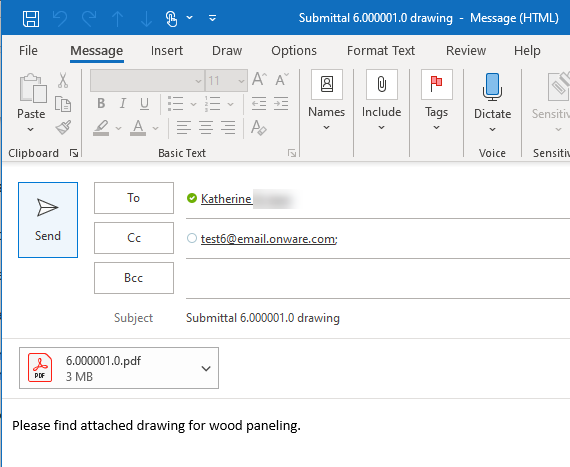
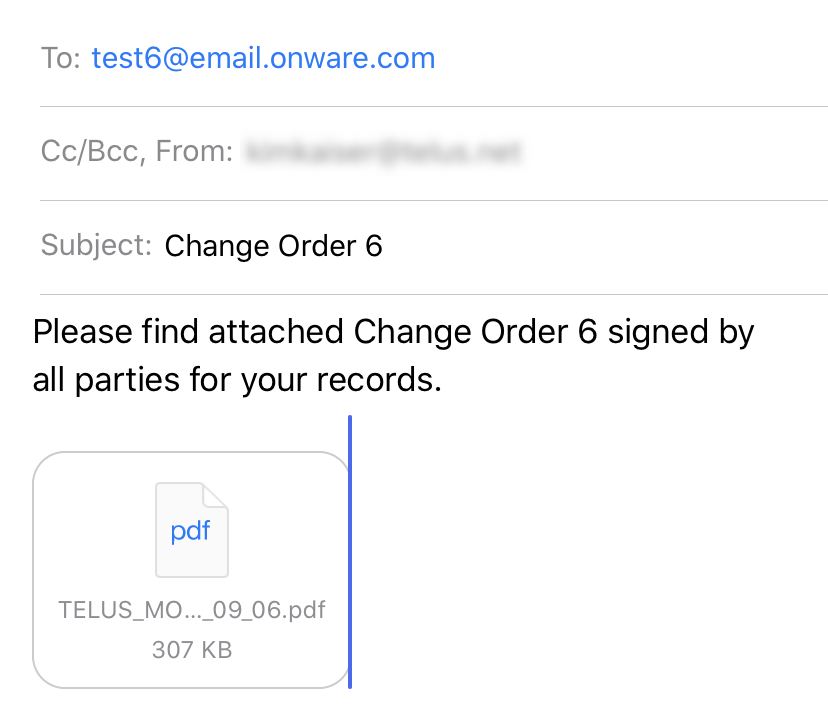
How to use Onware’s project e-mail is quick and easy! Simply include the project’s unique e-mail address in any project e-mail communication. Whether forwarding an existing e-mail from your inbox, or include the project’s e-mail address as a “To” or “Cc” recipient when sent, Onware does the rest!

Configure your Onware Cloud project with a unique e-mail address to have Onware automatically capture, store and record incoming e-mails along side all your other project documents in Onware’s centralized and secure location.  Visit our User Guide for steps to configure and how to view project e-mails.


Notice: Trying to access array offset on value of type null in /home2/plaidint/public_html/onwarepast/wp-content/plugins/js_composer_salient/include/autoload/vc-shortcode-autoloader.php on line 64
]]>
https://onwarepast.plaidphotography.com/2020/05/11/inbound-e-mail/feed/ 0
9.24.0 Enhancements and Fixes https://onwarepast.plaidphotography.com/2020/03/26/9-24-0-enhancements-and-fixes/ https://onwarepast.plaidphotography.com/2020/03/26/9-24-0-enhancements-and-fixes/#respond Thu, 26 Mar 2020 17:30:50 +0000 https://onware.com/?p=7068 Enhancements

Standard Search Page Layout, including Package and Email Package functions, now available everywhere!

The consolidated action link dropdown is now standard on all document types. Actions available will be dependent on user’s access and status of the document. Previously, Package and E-mail Package functionality was available only on certain documents. All feedback on these two new features has been positive and we are happy to announce in version 9.24.0, we have these features across all documents.

E-mail Package Improvements

When “E-mail Package” is selected, a confirmation message will display letting you know that your request is being processed.

A threshold has been identified when the number of documents for a Change Order package is too large and the package will be unsuccessful in generating.  When this threshold is exceeded, a warning message will now display and the package will not be available.

Site Visit

Create & Edit Site Visit Item

Prior to 9.24.0, “New Item” displayed as a pop-up window. Based on user feedback, we have re-designed this function with a more mobile-friendly layout. Users can now add a New Item in “form to expand” layout.  While the layout has been adjusted, all fields previously available are still available.  In addition, when creating a new area, a warning message will now display if it is identified an existing area matching the Number and Name of the new area already exists.

To help identify which Site Visit document the Item originated, the Site Visit Number will be displayed for every item. In addition, the Items on the Site Visit has also been replaced with an inline grid display. To edit, simply double-click on the Site Visit Item within the inline editor grid.

Additional Action Button in Site Visit

Contract Administrator can now choose which status the Site Visit should transition, based on the projects requirements.

Change

Prior to 9.24.0, the only date range available for refining your search was the date the Change was issued for Pricing. We have updated the date filter criteria to provide more flexibility and can now be used to search dates of “Issued”, “Issued for Pricing”, and “Re-Issued for Pricing”.

Additional Enhancements

  • “Browse for Project Users” list displays active and inactive users, and identifies which users are active
  • Request for Information CSV now includes revision details
  • Validation has been implemented to ensure all linked Consultant Recommendations on a Change have been closed prior to the Change being issued for Change Order.

Fixes

  • When using Firefox, impersonated user is not cleared when “clear” option is selected.
  • When an RFI response is “Marked Deleted” and subsequently “recovered”, its original status before being “Marked Deleted” is not retained
  •  Transmittal “Attach Related Documents” does not return results
  • When an Site Visit Item is imported, selecting “Import Items” again, the previous search for Items is retained
  • Change
    • When all Consultant Recommendation(s) is received, Change remains in “Requesting” status
    • When all Consultant Recommendation(s) is received, an action Item does not display for all Contract Administrators on the project
  •  Administrator specific
    • When editing an “Associated Company” in a User profile, selecting “Yes” on an auto-fill address pop-up causes the page to freeze
    • When an active project is selected, and a new user is created the “Discipline” list displays the active projects custom discipline lists rather than the global discipline list
    • Progress Claim
      • When revision is requested on a Progress Claim, all General Contractor Project Managers on the project receive an action item email
      • E-mail Subscription for “Revision Requested” is not generated when a revision is requested on a Progress Claim
]]>
https://onwarepast.plaidphotography.com/2020/03/26/9-24-0-enhancements-and-fixes/feed/ 0
9.23.1 Fixes https://onwarepast.plaidphotography.com/2020/03/18/9-23-1-fixes/ https://onwarepast.plaidphotography.com/2020/03/18/9-23-1-fixes/#respond Wed, 18 Mar 2020 21:15:54 +0000 https://onware.com/?p=7062
  • Change Order “Revised Contract Value” reverts to its previous value when “save” or “issue” is selected
  • Impersonated user is not maintained when “impersonate” option is selected
  • ]]>
    https://onwarepast.plaidphotography.com/2020/03/18/9-23-1-fixes/feed/ 0
    9.23.0 Enhancements and Fixes https://onwarepast.plaidphotography.com/2020/03/09/9-23-0-enhancements-and-fixes/ https://onwarepast.plaidphotography.com/2020/03/09/9-23-0-enhancements-and-fixes/#respond Mon, 09 Mar 2020 21:24:10 +0000 https://onware.com/?p=6950 Enhancements

    New Functionality: Package and E-mail Package

    • Both Request for Substitution (RFS) and Submittal Search pages have been refreshed to include the “Package” and “E-mail Package” functionality. Like the “Package” option, “E-mail Package” combines PDF documents into a single PDF, but does so behind the scenes, allowing you to work on other documents and tasks in Onware. You will receive an e-mail with the combined package of PDF documents once Onware has completed the combining.
    • E-mail package has been implemented on Change, Change Directive, and Progress Claim.
    Things to Consider
    • Non-PDF attachments, such as images, are not included in the package of documents
    • E-mail attachment size limits are still applicable when sending the E-mail package

    E-mail Subscription – Wording Updated

    To help provide clarity and understanding on all the different ways to access documents in an E-mail Subscription, we have updated the description for each available options.


    Submittal

    Submittal Search page grid results will now include the dates the Submittal was “Issued On” and/or “Returned On”

    Change Request Adjustments

    Go to this link for more information:

    https://onware.com/2020/03/09/change-request-adjustments/

    Change Order

    The Associated Changes and Change Directives sections now display status of each document. Since both Change and Change Directive have settings which can alter their workflow, these settings also alter when they are available to associate to a Change Order.  Displaying their respective status(es) will assist in clarifying which workflow is used.

    Revisions available in Request for Substitution Workflow

    Go to this link for more information:

    https://onware.com/2020/03/09/revisions-available-in-request-for-substitution-workflow

    Meeting

    Go to this link for more information:

    https://onware.com/2020/03/09/meeting-improvements/

    Transmittal

    • Standard Report for Transmittal is now available.
    • It can be accessed through the Reports section at the bottom of Transmittal Search page.

    Project Users List

    Want to know who are the active users in your project? That’s easy! We’ve added an “Active User” column to help you identify your users’ status to easily identify to everyone on the project whether these are current or past project participants.

    Administrator Specific

    Within the E-mail Subscription page of a project, Project Administrators can now filter and locate information in the “Existing E-mail Subscriptions” section easier using the “group by” or “search by typing” functions now available.

    Fixes

    • Updated Change Directive Approval setting to allow amendment of the setting when Change Directive is in “Initiated”, “Closed” or “Cancelled” status
    • Submittal Standard report no longer displays Submittal Histories which have been “marked as deleted”
    • When a Contract Administrator is reviewing a Consultant Recommendation, the Change Estimate section now displays
    • Unable to generate a PDF of an initiated Request for Substitution
    • Unable to send a Submittal History to a user with “Subcontractor” project-level access
    • “Inactive” users display in the list of users of “Browse for Project Users” feature in a Submittal
    • “Consultant” is misspelled when saving a Consultant Recommendation as a PDF.
    • When “signoff ” is used to close a Documentation, PDF snapshot is stuck in PDF queue
    • Page does not refresh when a Contract Administrator enters the “Period To” date in Progress Claim.
    • Contracts do not display when project is inactive.
    ]]>
    https://onwarepast.plaidphotography.com/2020/03/09/9-23-0-enhancements-and-fixes/feed/ 0